Short answer: A China visa application asks for two different rectangles. The printed photo is 33 mm x 48 mm (11:16). The online form asks for a JPEG of at least 354 x 472 pixels (3:4). Those two ratios are not the same, and the popular tool presets hand you a third rectangle, 385 x 560 pixels, that matches the print, not the form. Upload a scan of your printed photo and you are submitting the wrong shape.
Where each set of numbers comes from
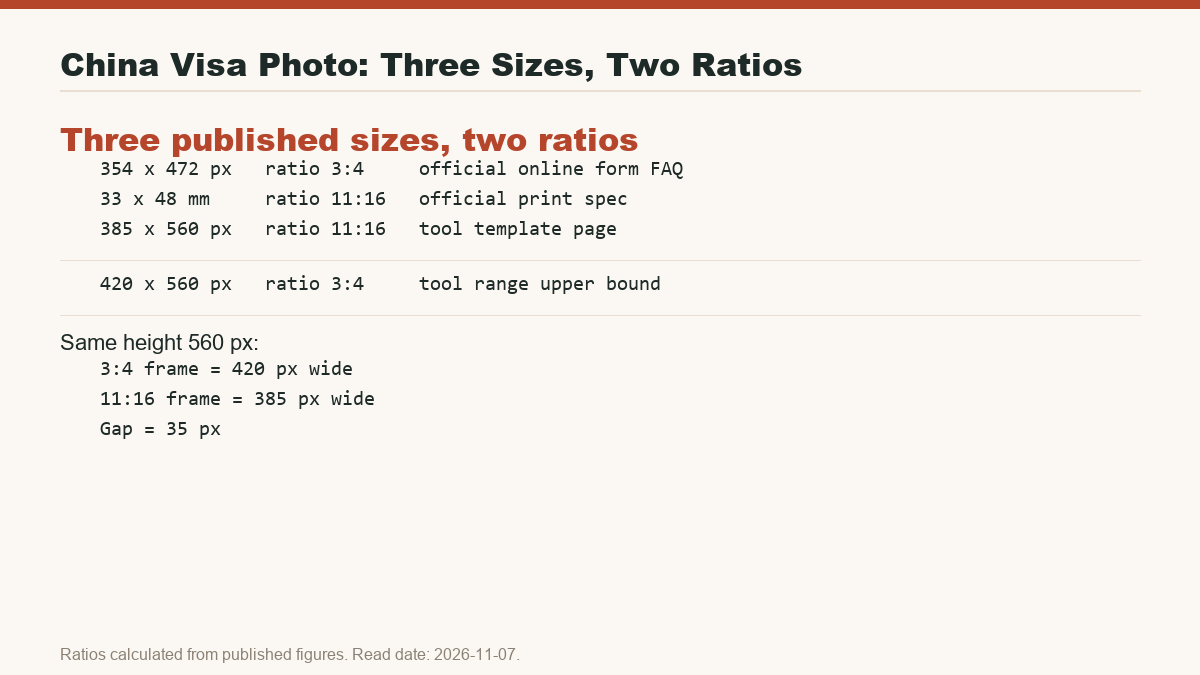
The three sizes below are all in circulation today. Each has a different source and a different use case. I have kept the sources separate so you can see which number belongs to which layer of the process.
| Size | Source | Use case | Ratio (calculated) |
|---|---|---|---|
| 354 x 472 px, 40-120 KB, JPEG | Official online visa application FAQ | Upload to the China Online Visa Application (COVA) form | 3:4 (0.7500) |
| 33 x 48 mm | Official consular photo specification | Printed photo handed in at the visa centre | 11:16 (0.6875) |
| 385 x 560 px, 600 DPI | 123passportphoto.com China visa tool page, last updated 19 June 2026 | Digital file produced by some online generators | 11:16 (0.6875) |
| 354 x 472 to 420 x 560 px | photogov.net China visa online photo page, read 2026-11-07 | Digital range quoted by another tool; also gives face width 191-251 px and face height at least 256 px | 3:4 at both ends (0.7500) |
All four ratios are my own calculations from the published figures; no notice prints the ratio itself. Working them out matters: 3:4 and 11:16 differ by 0.0625, which is about 8.33% of the 3:4 height. At the same 560 px height, a 3:4 frame is 420 px wide and an 11:16 frame is 385 px wide. That 35-pixel difference is not a rounding error.
Why the tool presets can send you in the wrong direction
The official online form wants a 3:4 JPEG, but two common tool outputs are not 3:4. The 385 x 560 px preset from 123passportphoto.com is 11:16, the same shape as the print. The photogov.net page lists a 3:4 range from 354 x 472 up to 420 x 560, which is internally consistent (420/354 = 560/472 = 1.1864), but it adds face-pixel requirements (191-251 px face width, at least 256 px face height) that the official FAQ does not mention.
This means a single search can hand you three different answers:
- 354 x 472 px or 420 x 560 px (3:4) if you are uploading.
- 33 x 48 mm if you are printing.
- 385 x 560 px (11:16) if a generator labels it “digital” but follows the print shape.
Uploading the 385 x 560 px file is the same mistake as scanning a print: the portal receives an 11:16 image when it expects 3:4.
The print-scan shortcut always fails
Print the photo, scan it at 300 or 600 DPI, then upload the scan. The logic is obvious, but the geometry is wrong. A 33 x 48 mm print scanned at 10 px per mm becomes 330 x 480 px, which is 11:16. The form wants 3:4. If you stretch the scan to 3:4, the head widens relative to the frame and the margins shift. If you crop it to 3:4, you cut into the mandatory space above the head and below the chin.
The margins written on the official notices (3-5 mm above the head, at least 7 mm below the chin, head height 28-33 mm) were measured on the uncropped print. Cropping or rescaling silently changes them. The photo that passed the ruler test on paper no longer passes the test on screen.
How to decide: re-crop or re-shoot?
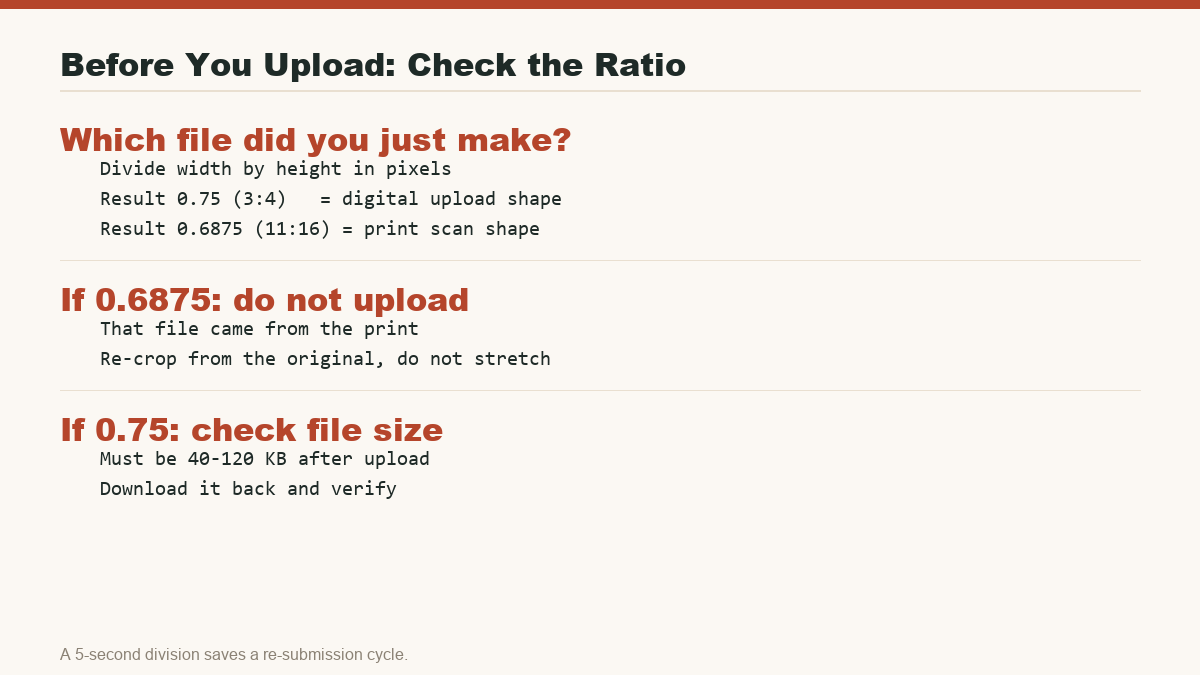
Before you decide, check the shape of the file you have, not just its pixel count or file size. Open the image properties or use a calculator: width divided by height.
| Width / height | What it means | What to do |
|---|---|---|
| 0.7500 (3:4) | This is the online form shape. The file could still be the wrong size or over-compressed, but the ratio is right. | Check that it is at least 354 x 472 px and between 40-120 KB. Upload, then download the uploaded copy and check again, because the portal can recompress the file without warning. |
| 0.6875 (11:16) | This file came from the print spec or a print-shaped generator preset. It is not an upload candidate. | Do not stretch it. Go back to the original digital frame. If the original has enough pixels, re-crop to 3:4 and re-measure head height, head width, top margin, and chin margin. If the original does not have enough margin on the sides, re-shoot. |
| Anything else | Neither the print spec nor the online form. | Start over from the raw camera file or take a new photo. |
Re-cropping only works if the original frame has enough background. A tight crop on the face may already be too narrow to add the side margins a 3:4 frame needs. In that case, stretching would be faster and wrong; re-shooting is the only fix.
One shoot, two exports: the cleanest workflow
The safest approach is to separate the two deliverables from the start. Shoot once, then export two files from the same frame:
- A 3:4 JPEG at least 354 x 472 px and 40-120 KB for the online form.
- A 33 x 48 mm glossy print for the counter.
Use the same pose, same expression, and same background for both. The two files should look identical on screen, but their rectangles are different. If you only have one deliverable, produce the digital 3:4 file first. The print can be made from the original frame later, but the digital file should never be made from the print.
What to tell the photographer
Most photo studios understand “passport size” but not the Chinese rectangle. Give them the millimetre numbers, not the country name. Ask for:
- Frame: 33 mm x 48 mm, head height 28-33 mm, white or near-white background, ears visible.
- Digital file: JPEG, at least 354 x 472 px, ratio 3:4, 40-120 KB.
- Both from the same shot.
If they can only deliver one shape, take the 3:4 digital file and order prints separately. Do not let them hand you a scanned print and label it “digital”.
Bottom line
The China visa photo problem is not that the rules are secret; it is that the same application uses two different rectangles. The printed spec is 11:16. The online form is 3:4. Mix them up and the photo that looks correct on paper gets rejected on screen. Check the ratio first, check the file size after upload, and never use a scan of a print as your digital file.
See the full China visa photo requirements guide for the head-width rules, the 40-120 KB file size trap, and what real rejections look like. If you are still deciding whether you need a visa at all, read the China tourist visa guide.