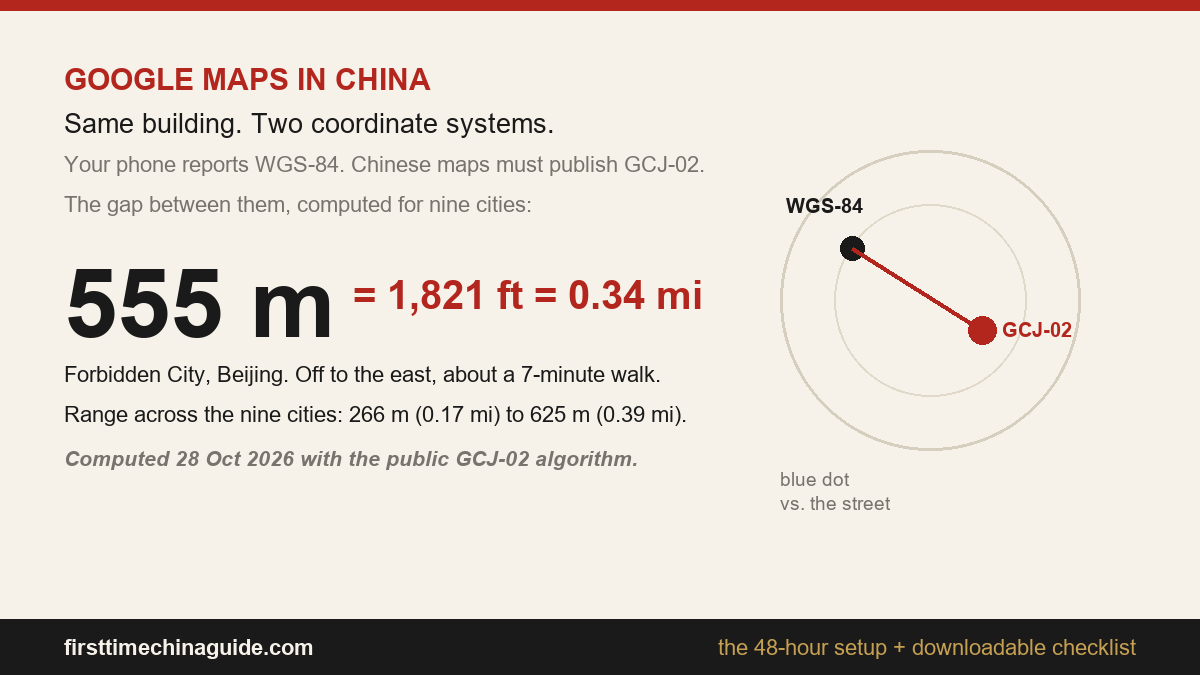
Short answer: Google Maps does not navigate you in mainland China, and it fails in two separate ways that need two separate fixes. The service is blocked, which a roaming SIM or a VPN can get around. And the map is drawn on a coordinate system shifted from the one your phone’s GPS reports, which nothing on your phone can get around. How far it is shifted, why, and how to prove it, is a separate question with its own page: does Google Maps work in China. This page is the other half — what to install, in what order, before you fly.
What works instead: AMap (sold outside China as AMap Global, with an English interface), Apple Maps if you carry an iPhone, offline map packs downloaded before you fly, and your hotel’s name in Chinese characters. The whole setup takes about forty minutes, and it belongs in the 48 hours before departure, not in the taxi queue at the airport.
Everything below is either read off the app store listings on 28 October 2026, or computed with the public GCJ-02 conversion algorithm on the same date. The one-page checklist near the end is the compressed version of all of it.
Four jobs, four tools. The mistake almost everyone makes is installing Google Maps plus a VPN first, then discovering that the geometry is wrong no matter how good the connection is. These are the apps that were actually built against the data.
| Job to be done | Tool | What you give up |
|---|---|---|
| Walking and driving directions | AMap (AMap Global) | The English layer is thinner than the Chinese one |
| Calling a car | DiDi, or the DiDi tile inside Alipay | The driver needs a phone number that reaches you |
| Metro, bus, and a backup that works offline | Apple Maps, on an iPhone | Far fewer restaurant and shop listings than AMap |
| Reading a sign, a menu, or a driver’s message | Camera translation | Slower than simply showing the screen to a person |
There are two coordinate systems and only one of them is global: WGS-84 is what the satellites give your phone, GCJ-02 is what Chinese map services publish in, and the gap between them is a fixed offset that varies by position — 555 m at the Forbidden City, or 1,821 ft, or about seven minutes on foot, with the coordinates, the conversion and a downloadable table on the does-it-work page.
That produces two failures that look similar and are not:
This is why the standard advice that Google Maps works in China if you use a VPN is only half true, and it is the half that gets people lost at eleven at night with a suitcase.
The offset for each of those landmarks, point by point with the date on every row, is on the coordinate reference page.
Offline packs matter more in China than anywhere else, because the app that most people already have cannot route without a server. A pre-downloaded Google map will show you streets, and then fail when you ask for a route: the routing happens on Google’s side. The packs below belong to apps that can route on the device.
AMap. The offline map entry is not on the map screen, which is why people give up looking for it.
Apple Maps. Two ways in, both current as of iOS 17 and later:
Apple’s own App Store listing for Maps states that downloaded areas include place information and turn-by-turn directions, which is the part that makes it a genuine backup rather than a picture of a map. That single sentence is why an iPhone is worth carrying as the second device even if you plan to live in AMap.
Ratings for Chinese map apps in English-language stores are poor, and it is worth knowing what that number is actually measuring. All figures below were read off the listings on 28 October 2026.
| App | Rating | Reviews | Installs | Last updated | Ads or purchases |
|---|---|---|---|---|---|
| AMap Global | 2.5 | 33.5K | 10M+ | 27 Oct 2026 | In-app purchases |
| Baidu Map | 2.3 | 22.7K | 5M+ | 18 Aug 2025 | Contains ads |
| Apple Maps | Ships with iOS | — | — | Ships with iOS | None |
Read the last-updated column before you read the rating. AMap’s listing had been updated the day before this was written; Baidu’s had not been touched in more than fourteen months. A 2.5-star score on a Chinese navigation app is a complaint about the English layer and about sign-in friction, not about whether the map data is any good — the Chinese interface of the same app is what people in the mainland actually navigate with. But the update date is a fair signal of which one is being maintained for visitors, and that is AMap.
English search in a Chinese map works for landmarks and almost nothing else. The Forbidden City and the Bund will resolve; a hotel on a side street usually will not, and the first result it offers may be a different branch of the same chain across town. Four ways to get the Chinese name, in order of speed:
Once you have the characters, paste rather than type. Pasting avoids the tone and character errors that turn a correct address into a wrong one, and it works even if you cannot read a single character of what you pasted.
Everything above compressed into a single printable page: three timed blocks (48 hours out, at the airport, the first ten minutes after landing), the offset table in metres, feet and miles, a conversion crib, and two lines to show a driver instead of trying to pronounce them.
Download the China navigation setup checklist (PDF, one page, no signup)
Print it, or save it to the phone before you fly — the whole point is that it does not need a connection to be useful, which is more than can be said for anything that loads from a server.
Does Google Maps work in China with a VPN? It loads, and that is the trap. The tiles come back shifted by hundreds of metres because the underlying data is in a different coordinate system, and the business listings are stale. Use it to confirm a name in English, then navigate with AMap.
Is AMap usable in English? Yes, through the international listing, AMap Global. The English layer is thinner than the Chinese one (some menus and many place names stay in Chinese) and the store rating reflects that. It is still the most complete map data you can get as a visitor.
Can I skip all of this and just use Apple Maps? On an iPhone, largely yes. Apple’s mainland China maps are built on Chinese map data, so the pins line up with the streets, and offline areas include directions. What you lose is the density of restaurant and shop listings, which is where AMap is far ahead.
If you are still deciding how you will get online once you land, the China eSIM guide covers which plans route outside the mainland, and how to pay in China covers the Alipay setup that DiDi and most metro gates depend on. If Beijing is your first stop, the Beijing guide and the Forbidden City ticket page are the two that pair with this one. More of the same lives in the China digital guide.
Practical first-trip China guides — visas, VPN, eSIM, Alipay, trains, and city routes.